> For the complete documentation index, see [llms.txt](https://huy312100.gitbook.io/software-development/llms.txt). Markdown versions of documentation pages are available by appending `.md` to page URLs; this page is available as [Markdown](https://huy312100.gitbook.io/software-development/javascript/es6-techniques/hoisting.md).
# Hoisting
Let's start with example 1 (len)
```javascript
#Ex1:
console.log(a);
```
The result is not unusual: raised error `a is not define`, because the variable `a`has not been declared anywhere
Example 2:
```javascript
#Ex2:
console.log(a);
a = 'Hello Hoisting';
```
This example seems "a lot" more complicated than the above example but the result is still the same:`a is not define`
Example 3:
```javascript
#Ex3:
var a;
console.log(a);
```
The output will be `undefined`because `a`it has been declared but has not yet been assigned a value
Example 4
```javascript
#Ex4:
console.log(a);
var a;
```
By chance and surprisingly, the results were the same as `Ex3`, both `undefined` Why is that so???
#### Define
Hoisting is the default action of Javascript, it will move the declaration to the top. In Javascript, a variable can be declared after being used.
We will continue `Ex5`and explain more clearly for example 4.
```javascript
#Ex5
console.log(a);
var a = 'Hello Hoisting'
#Output = ???
```
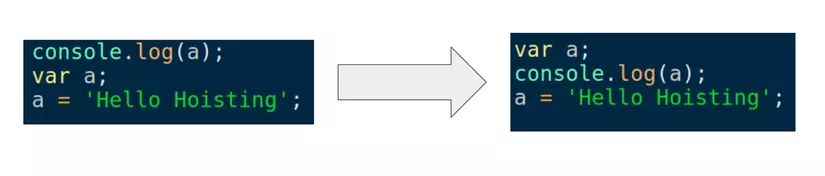
The results will be interpreted according to the following diagram: Explanation:
* The Javascript compiler will separate the section `var a = 'Hello Hoisting'`into two parts: declaration and value assignment
* Declare:`var a`
* Assign value`a = 'Hello Hoisting'`
* According to Hoisting, Javascipt will move the declaration to the top. Therefore, only the declaration part will be moved to the top, while the value assignment part will remain in the same order so it will remain at the bottom. So the Output will be`undefined`
## Hoisting of function?
#### Define
The Javascript compiler will move the declaration to the top just like it does with variables. Example 6:
```javascript
say_something('YOLO');
function say_something(a){
console.log(a);
}
```
Output is the same as with the variable part`YOLO`
Example 7:
```javascript
#Ex7:
do_something();
function do_something(){
console.log(a);
var a = 'fly';
}
```
The results will be interpreted according to the following diagram:
Explain:
* Just like with part 1, the internals of the function `do_something`are also used by the compiler `hoisting`.
* But **the declaration is only moved to the top of the function `do_something`, not the program**
So, Output will be`undefined`
## Hoisting function vs Hoisting variable
#### Define:
**The Javascript compiler will move the function definition before the variable declaration.** Example 8:
```javascript
var show_me;
show_me();
function show_me() {
console.log('Money');
}
show_me = function() {
console.log('Diamond');
}
```
According to the above definition, the output will be`Money`
**Functions declared later, if they have the same name, will overwrite the function declared before**
Example 9:
```javascript
var show_me;
show_me();
function show_me(){
console.log('Money');
}
show_me = function(){
console.log('Diamond');
}
function show_me(){
console.log('Gem');
}
```
Output will be`Gem`
## Summary
* The Javascript compiler will move the declaration of variables and functions to the top, it is called Hoisting
* Only the declaration part is put at the top, not the value assignment part
* The function declaration is placed before the variable declaration